|
ADG 3D Tools for 3DStudio MAX®.
Try it for free, buy it for just $199.00! FAQ Plug-in
for 3DS MAX 4.0 - 12.0 ®. Copyright © 2000-2010, Albatross Design
Group, Inc. All Rights Reserved.
ADG 3D Tools (ADG Exporter & ADG Viewer) enables file export
from 3DS MAX to ADG File Format developed for Web Publishing (Albatross
Design Group, Inc. File Format, Copyright © 2000-2010.)
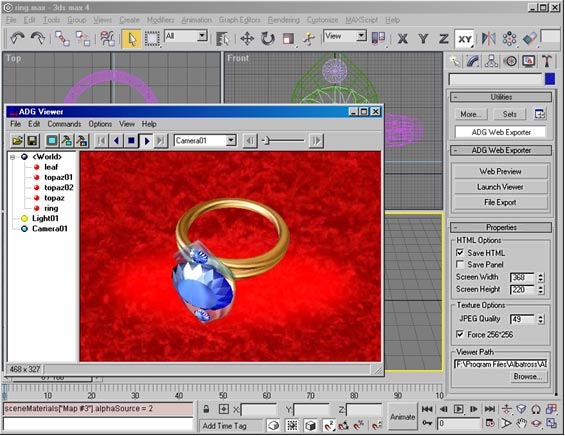
ADG 3D Tools has a built-in ADG Viewer for fast viewing
of 3D scenes in ADG File Format. No HTML or Java programming knowledge
required! ADG Files can be viewed through ADG
Java Viewer that eliminates a Plug-in installation and gives
a platform independent use on the Internet.
System Requirements
- 3DS MAX 4.0 - 12.0 ®
- Intel Pentium ® - class PC (3000 MHz or higher)
- Microsoft ® Windows ® 95, 98, 2000 Professional, XP,
Millennium, Vista, Win7
- Microsoft Internet Explorer, Opera, Firefox, Google Chrome, Safari
Installation
ADG
Exporter is distributed within a single file ADGexporter.exe
, so simply launch ADGexporter.exe
file to start installation. The installer will automatically
detect your 3DS MAX ® directory and install ADGview.dlu
plugin into appropriate plug-in directory. ADG
Direct3D Viewer will be installed into your system Program
Files directory, Albatross subdirectory. If it
has a problem locating 3DS Max directory, please, find it manually.
As usually it is c:\3DSMax\Plugins\ , or you
can get it from 3D Studio MAX ® Help. Installation does
not affect any Windows system files, so there is no need to
restart your computer after the installation. Use Start/Programs
menu to launch ADG Exporter Sample file. Use corresponded
icon on desktop to launch ADG Viewer .
Note: ADG Viewer requires
DirectX Version 6.0 or higher to be installed.
You can download the latest versions on Microsoft
® Web Site.
Supported Properties
- Z-buffer sorting
- Supersampling Antialiasing
- Multiple meshes within a scene
- Standard materials
- Diffuse, Ambient and Specular color
- Specular Power
- Material Transparency
- Diffuse texture maps
- Opacity texture maps
- Reflection texture maps
- AVI texture maps
- Ambient Color
- Background Color
- Background Image
- Omni Lights
- Free and Target Camera
- Perspective Viewports
- Default Light inserting
- Default Camera inserting
- Default <World> node inserting
- Key-framed animation
- Rotation, translation, scaling and visibility track support
- Text in Texture maker
- Manual 3D objects manipulation (keyboard, mouse)
- Javascript for 3D objects manipulation
- Javascript for separately tracks control.
- Javascript for texture map, colors and text control
- Automated embedding into the web page
- Web Browser preview
Viewing 3D Models using ADG Web Exporter
1. On the Utilities panel, click More, and select
"ADG Web Exporter".
2. Click "Web Preview".
Viewing ADG Files using ADG Viewer 5.0
1. Click "Launch Viewer"
2. Select File-Open.
3. In the Select File dialog box, choose a file name and
click Open.
Exporting
Files from 3DS MAX ® to ADG File Format
1. Select File-Export.
2. In the Select File dialog box type a file name and
select location for the saved file, then click Save.
Embedding ADG Composition into Your WEB Site.
- Press File Export button to store composition into
.ADG format file.
- HTML page will be created automatically, for example "yourfile.html"
.
- Upload files ADGview.jar, "yourfile.html", "yourfile.adg"
you've just created earlier to the apprppriate Web Site Directory.
Viewing 3D Compositions through the WEB Browser
on the Internet
Use a standard Web Browser. Type proper web address of the HTML
page "yourfile.html", you've just uploaded. No special plug-in
required.
License
The Trial Version of ADG 3D Tools is fully functional except for
a watermark "Unregistered" in ADG Direct3D Viewer
and ADG Java Viewer. To purchase a Registration Key, please click
here and follow the instructions. Upon confirmation of payment,
you will receive a registration code by email. After launching
this Registration Key, registration reminders will cease and watermarks
will no longer be added to your 3D scenes.
Support
If you would like to troubleshoot a problem, or have a question
regarding our products click here
to view the FAQ page. If you have a technical problem, question
or comment, please send e-mail to support@albatrossdesign.com
Download Now
Try it for free, buy it for just $199.00! |